புல்லட் விற்பனை அமோகம்.. வலிமையான வர்த்தகத்தில் ராயல் என்பீல்டு..!
News
oi-Prasanna
By Prasanna
பெங்களூரு: ராய்ல் என்பீல்ட் நிறுவனத்தின் தயாரிப்புகளுக்கு மக்கள் மத்தியில் சிறந்த வரவேற்பு கிடைத்துள்ளதால், இந்நிறுவனத்தின் விற்பனை தொடர்ந்து அதிகரித்து வருகிறது.
2015ஆம் நிதியாண்டின் அக்டோபர் மாதத்தில் மட்டும் இந்நிறுவனத்தின் வாகன விற்பனை எண்ணிக்கை 44,138 ஆக உயர்ந்துள்ளது. கடந்த ஆண்டின் இதேகாலக்கட்டத்தை ஒப்பிடுகையில் இதன் அளவு 73 சதவீதம் அதிகரித்துள்ளது.
ஏற்றுமதியில் மந்தம்..
ராய்ல் என்பீல்ட் நிறுவனத்திற்கு இந்தியாவில் கிடைத்த வரவேற்பு வெளிநாடுகளில் கிடைக்கவில்லை, இதனால் இந்நிறுவனத்தின் ஏற்றுமதி அளவுகள் சுமார் 27 சதவீதம் வரை குறைந்துள்ளது.
அக்டோபர் மாதத்தில் வெறும் 384 வாகனங்களை மட்டுமே ராய்ல் என்பீல்ட் நிறுவனம் வெளிநாடுகளுக்கு விற்பனைக்காக ஏற்றுமதி செய்துள்ளது.
மொத்த விற்பனை
அக்டோபர் மாதத்தில் இந்தியா மற்றும் வெளிநாடுகளில் இந்நிறுவனத்தின் விற்பனை அளவு சுமார் 26,039இல் இருந்து 71 சதவீதம் அதிகரித்து 44,522 ஆக உயர்ந்துள்ளது.
புதிய சந்தை
இக்காலகட்டத்தில் ராயல் என்பீல்ட் நிறுவனம் மாட்ரீன் மற்றும் பாரிஸ் பகுதிகளில் தனது சந்தையை விரிவாக்கம் செய்துள்ளது.
பிரான்ஸ்
இந்நிறுவனம் பிரான்ஸ் நாட்டு வர்த்தகத்தில் சுமார் 80 டீலர்களைக் கொண்டு கடந்த 7 மாதத்தில் சுமார் 60 சதவீத வளர்ச்சியைப் பதிவு செய்துள்ளது. இதன் காரணமாக இச்சந்தையில் ராயல் என்பீல்ட் நிறுவனம் தொடர்ந்து தனது விரிவாக்கப் பணிகளைச் செய்து வருகிறது.
ஸ்பெயின்
பிரான்ஸ் போன்று ஸ்பெயினில் 25 டீலர்களைக் கொண்டு இந்நிறுவனத்தின் வர்த்தகம் 23 சதவீதம் உயர்ந்துள்ளதாக ராயல் என்பீல்ட் நிறுவனம் தெரிவித்துள்ளது.
Notifications
Settings
Clear Notifications
No New Notifications
Notifications
Use the toggle to switch on notifications
Block for 8 hours
Block for 12 hours
Block for 24 hours
Don't block
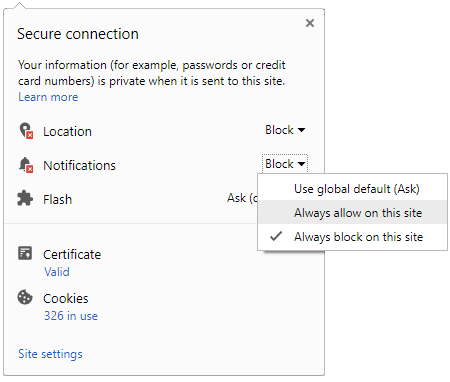
To start receiving timely alerts, as shown below click on the Green “lock” icon next to the address bar
Click it and Unblock the Notifications
Close X
Close X
To Start receiving timely alerts please follow the below steps:
Click on the Menu icon of the browser, it opens up a list of options.
Click on the “Options ”, it opens up the settings page,
Here click on the “Privacy & Security” options listed on the left hand side of the page.
Scroll down the page to the “Permission” section .
Here click on the “Settings” tab of the Notification option.
A pop up will open with all listed sites, select the option “ALLOW“, for the respective site under the status head to allow the notification.
Once the changes is done, click on the “Save Changes” option to save the changes.



 Click it and Unblock the Notifications


 Sign in with Google