எப்போதுமே லாபம் தான்: ஒன்இந்தியா கூப்பன்ஸ்
News
Published: Thursday, August 25, 2016, 16:57 [IST]
பங்குச்சந்தை முதலீட்டு நஷ்டம் வரலாம், ஆனால் ஒன்இந்தியா கூப்பன்ஸ் மூலம் உங்களுக்கு எப்போதுமே லாபம் தான்.
சந்தையில் பேடிஎம், லெஸ்கார்ட், பிளிப்கார்ட் நிறுவனங்கள் அளித்துள்ள அதிரடியான ஆஃபர்களைத் தமிழ் குட்ரிட்டன்ஸ் ஒன்இந்தியா கூப்பன்ஸ் உடன் இணைந்து வாசகர்களுக்குத் தொகுத்து வழங்கியுள்ளது.
கீழே உள்ள இணைப்புகளைக் கிளிக் செய்து தள்ளுபடி ஆஃபர்களைப் பெறுங்கள்.
Paytm Coupons for August 2016! Get Rs.400 Cashback on Flights, Bill Payments, Recharge & More
Lenskart coupon for August 2016! Get Upto 70% Off Contact Lenses, Sunglasses, Shades & More
Flipkart coupon for August 2016! Get 80% Off on Electronics, Fashion, Mobiles & More
Myntra Coupons for August 2016! Get 40% Off on Reebok shoes, Jumpsuits & More
Jabong coupon for August 2016! Get Up to 70% Off Shop from over 2,00,000 Styles
Share This Article
English summary
Sensex Opens Flat So Does Asian Markets BUT THIS WILL MAKE YOUR DAY
Markets may have ups and downs, but the offers provided below from Oneindia Coupons are always profitable. Check Oneindia coupons for more free promo codes, discount coupon codes, deals and more
Story first published: Thursday, August 25, 2016, 16:57 [IST]
See More On: oneindia coupons, tamil goodreturns, goodreturns, business news in tamil, stock market, tamil, news, tamil news, ஒன்இந்தியா கூப்பன்ஸ், தமிழ் குட்ரிட்டன்ஸ், வ
Other articles published on
Aug 25, 2016
Block for 8 hours
Block for 12 hours
Block for 24 hours
Don't block
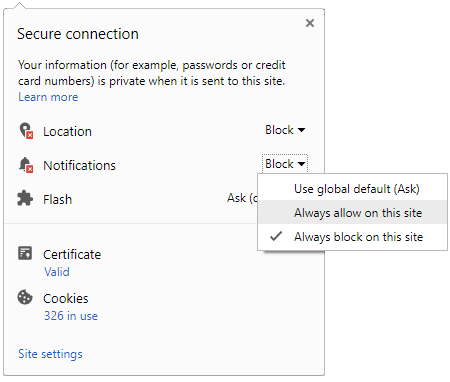
To start receiving timely alerts, as shown below click on the Green “lock” icon next to the address bar
Click it and Unblock the Notifications
Close X
Close X
To Start receiving timely alerts please follow the below steps:
Click on the Menu icon of the browser, it opens up a list of options. Click on the “Options ”, it opens up the settings page, Here click on the “Privacy & Security” options listed on the left hand side of the page. Scroll down the page to the “Permission” section . Here click on the “Settings” tab of the Notification option. A pop up will open with all listed sites, select the option “ALLOW“, for the respective site under the status head to allow the notification. Once the changes is done, click on the “Save Changes” option to save the changes. Gender
Select your Gender
Age
Select your Age Range



 Click it and Unblock the Notifications


 Sign in with Google