தீபாவளி சிறப்புத் தள்ளுபடி விற்பனை: பிளிப்கார்ட், ஸ்னாப்டீல், அமேசான்
News
Updated: Thursday, February 23, 2017, 14:33 [IST]
தீபாவளி பண்டிகை நெருங்கி வரும் நிலையில் நாட்டின் முன்னணி ஈகாமர்ஸ் நிறுவனங்கள் புதிய வாடிக்கையாளர்களைப் பெறுவதற்காகவும், தற்போது இருக்கும் வாடிக்கையாளர்களைத் தக்கவைத்துக்கொள்ள நாட்டின் முன்னணி ஈகாமர்ஸ் நிறுவனங்கள் அதிரடி தள்ளபடிகளை அறிவித்துள்ளது.
இதில் ஸ்னாப்டீல் நிறுவன தீபாவளி பண்டிகைக்குத் தன்னையே புதிதாக உருவாக்கிக்கொள்ள முடிவு செய்துள்ளது. இதற்காகத் தனது இணையதளத்தில் ஆர்டர் செய்யும் பொருட்களை டெலிவரி செய்யும்போது சில கிஃப்ட் பொருட்களை வழங்கத் திட்டமிட்டுள்ளது.
இதேபோல் பிளிப்கார்ட் மற்றும் அமேசான் நிறுவனங்களும் தனது தள்ளுபடிக்கான பல்வேறு பணிகளைத் தொடர்ந்து செய்து வருகிறது.
அமேசான் நிறுவனத்தின் கிரேட் இந்தியன் திருவிழா
பிளிப்கார்ட் நிறுவனத்தின் பிக் பில்லியன் டே தள்ளுபடி விற்பனை
ஸ்னாப்டீல் நிறுவனத்தின் அன்பாக்ஸ் தீபாவளி சேல் விற்பனை
Share This Article
English summary
The Amazon Great Indian Festival, Flipkart Big Billion Days Sale, Snapdeal Unbox Diwali Sale Get Upto 90% Off
The three best Online retailers with there great online festive offers are here, while Snapdeal has re-branded totally to give its users the best surprises in there packages, Flipkart is all set to showcase the big billion day deals and Amazon is ready to go with its best offers on all categories this October, Below are top 5 cashback offers from these retailers to look out for
Story first published: Thursday, February 23, 2017, 14:33 [IST]
See More On: flipkart, amazon, snapdeal, ecommerce, coupons, பிளிப்கார்ட், அமேசான், ஸ்னாப்டீல், ஈகாமர்ஸ், கூப்பன்ஸ், oneindia coupons, tamil goodreturns, ஒன்இந்தியா கூப்பன்ஸ், தமிழ் குட்ரிட்டன்ஸ்
Block for 8 hours
Block for 12 hours
Block for 24 hours
Don't block
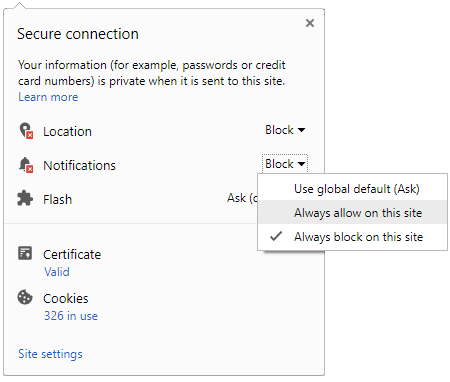
To start receiving timely alerts, as shown below click on the Green “lock” icon next to the address bar
Click it and Unblock the Notifications
Close X
Close X
To Start receiving timely alerts please follow the below steps:
Click on the Menu icon of the browser, it opens up a list of options. Click on the “Options ”, it opens up the settings page, Here click on the “Privacy & Security” options listed on the left hand side of the page. Scroll down the page to the “Permission” section . Here click on the “Settings” tab of the Notification option. A pop up will open with all listed sites, select the option “ALLOW“, for the respective site under the status head to allow the notification. Once the changes is done, click on the “Save Changes” option to save the changes. Gender
Select your Gender
Age
Select your Age Range



 Click it and Unblock the Notifications


 Sign in with Google