தீபாவளி விடுமுறை: விமான பயணத்தில் அதிரடி ஆஃபர்கள்
தீபாவளி பண்டிக்கையை மேலும் சிறப்பாக்க வருகிறது ஒன்இந்தியா கூப்பன்ஸ். News
Published: Friday, October 28, 2016, 15:14 [IST]
பொதுவாக விடுமுறை என்றாலே மக்கள் ஒரு இடத்தில் இருந்து மற்றொரு இடத்திற்கு செல்லவார்கள். இன்றைய வேகமான வாழ்க்கை முறையில் மேல்தட்டு மக்கள் மட்டும் அல்லாமல் நடுத்தர மக்களும் அதிகளவில் விமான பயணத்தை மேற்கொள்ள ஆர்வம் காட்டுகின்றனர்.
இப்படிபட்ட ஒரு சூழ்நிலையில் தீபாவளி பண்டிக்கையை முன்னிட்டு விமான பயணத்திற்கு அதிரடியான ஆஃபர்களை ஆன்லைன் டிக்கெட் புக்கிங் நிறுவனங்கள் ஆஃபர்கள், தள்ளுபடிகள் என வாரி வழங்கியுள்ளது.
இதனை வாடிக்கையாளர்களுக்கு அளிக்க தமிழ் குட்ரிட்டன்ஸ் மற்றும் ஒன்இந்தியா கூப்பன்ஸ் இணைந்துள்ளது.
நீங்கள் செய்யவேண்டியது அனைத்தும் இதை கிளிக் செய்யவேண்டியது தான்.
Share This Article
English summary
Diwali, 50% Cashback on Flights & Hotels
Diwali, the festival of lights, As we know the traditional way of celebrating Diwali is not as eco-friendly as we think, But people is the country now are adopting unique and eco-friendly ways of celebrating this big festive, Well If you are planning to travel this Diwali to find some peaceful and environmental friendly places to celebrate, Here are the five places which you should consider. - Tamil Goodreturns
Story first published: Friday, October 28, 2016, 15:14 [IST]
See More On: oneindia coupons, tamil goodreturns, goodreturns, business news in tamil, stock market, tamil, news, tamil news, ஒன்இந்தியா கூப்பன்ஸ், தமிழ் குட்ரிட்டன்ஸ், வ
Other articles published on
Oct 28, 2016
Block for 8 hours
Block for 12 hours
Block for 24 hours
Don't block
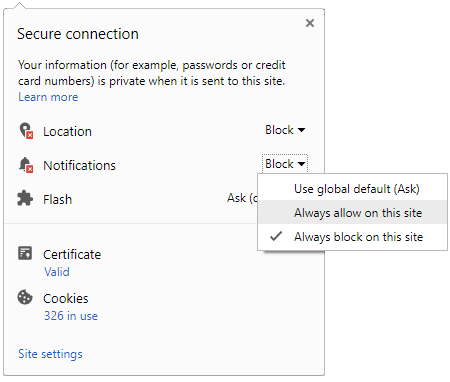
To start receiving timely alerts, as shown below click on the Green “lock” icon next to the address bar
Click it and Unblock the Notifications
Close X
Close X
To Start receiving timely alerts please follow the below steps:
Click on the Menu icon of the browser, it opens up a list of options. Click on the “Options ”, it opens up the settings page, Here click on the “Privacy & Security” options listed on the left hand side of the page. Scroll down the page to the “Permission” section . Here click on the “Settings” tab of the Notification option. A pop up will open with all listed sites, select the option “ALLOW“, for the respective site under the status head to allow the notification. Once the changes is done, click on the “Save Changes” option to save the changes. Gender
Select your Gender
Age
Select your Age Range



 Click it and Unblock the Notifications


 Sign in with Google