நாடு முழுவதும் உள்ள 37 வங்கிகளின் ஊழியர்களுக்கு ஊதிய உயர்வு வழங்குவது தொடர்பான பேச்சு வார்த்தை இன்று நடைபெறுகிறது. இந்திய வங்கிகள் சங்கத்துடன், தொழிற்சங்கங்கள் நடத்தும் பேச்சுவார்த்தையில் தீர்வு ஏற்படுமா என்று எதிர்பார்க்கப்படுகிறது.
ஊதிய உயர்வு பேச்சுவார்த்தை
2018 ஆம் ஆண்டு மே 5 ஆம் தேதி இந்திய வங்கிகள் சங்கத்துடன் நடந்த பேச்சுவார்த்தையில், 2 சதவீத ஊதிய உயர்வு வழங்க அரசு ஒப்புக் கொண்டது. இதற்கு எதிர்ப்புத் தெரிவித்து வங்கி ஊழியர்கள் 2 நாள் வேலை நிறுத்தத்தை மே 30 ஆம் தேதி தொடங்கினர் 25 விழுக்காடு ஊதியம் வழங்க வேண்டும் என்பதில் அவர்கள் உறுதியாக உள்ளனர். இதனை வலியுறுத்தி பொதுத்துறை, தனியார் மற்றும் வெளிநாடுகளைச் சேர்ந்த 37 வங்கி ஊழியர்களின் பிரதிநிதிகள் பேச்சுவார்த்தையில் கலந்து கொள்கின்றனர்.
2 விழுக்காடா - போதாது
2015 ஆம் ஆண்டு 10 வது ஊதிய ஒப்பந்தம் கையெழுத்தானது. இதன்படி 2012 ஆண்டு முதல் 2017 ஆண்டுவரை ஊதிய உயர்வு வழங்கப்பட்டது. இதுவரை 15 சதவீத ஊதிய உயர்வு என அறிவிக்கப்பட்ட தற்போது 2 சதவீதம்தான் வழங்கப்படும் எனக் கூறுவதை ஏற்க முடியாது என, தொழிற் சங்கங்கள் தெரிவித்துள்ளன.
ஊழியர்களுக்குச் சுமை
செயல்படாத சொத்துக்களின் மீதான வருவாய் குறைந்ததற்கு வங்கி ஊழியர்கள் எந்த விதத்திலும் பொறுப்பேற்க முடியாது. ஜன்தன், முத்ரா, அடல் பென்சன் திட்டம் உட்படப் பல்வேறு திட்டங்களால் ஊழியர்கள் சிரமத்துக்கு ஆளாகியுள்ளனர். பணமதிப்பிழப்பு நடவடிக்கையின் கூடுதல் நேரம் உழைத்துள்ளதாகவும் தொழிற்சங்கள் தெரிவித்துள்ளன.
Notifications
Settings
Clear Notifications
No New Notifications
Notifications
Use the toggle to switch on notifications
Block for 8 hours
Block for 12 hours
Block for 24 hours
Don't block
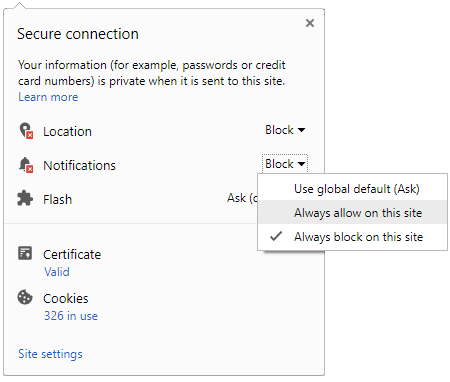
To start receiving timely alerts, as shown below click on the Green “lock” icon next to the address bar
Click it and Unblock the Notifications
Close X
Close X
To Start receiving timely alerts please follow the below steps:
Click on the Menu icon of the browser, it opens up a list of options.
Click on the “Options ”, it opens up the settings page,
Here click on the “Privacy & Security” options listed on the left hand side of the page.
Scroll down the page to the “Permission” section .
Here click on the “Settings” tab of the Notification option.
A pop up will open with all listed sites, select the option “ALLOW“, for the respective site under the status head to allow the notification.
Once the changes is done, click on the “Save Changes” option to save the changes.



 Click it and Unblock the Notifications


 Sign in with Google