இன்று ஃபிக்ஸட் டெபாசிட் திட்டங்களில் கொடுக்கும் வட்டியை விட கொஞ்சம் அதிக வருமானம் கொடுக்கும் மீடியம் டூ லாங் டேர்ம் கடன் மியூச்சுவல் ஃபண்டுகளைப் பார்க்கப் போகிறோம்.
கடந்த 5 ஆண்டில், மீடியம் டூ லாங் டியூரேஷன் ஃபண்டுகளில் அதிகபட்சமாக எஸ்பிஐ மேக்னம் இன்கம் ஃபண்ட் 9.06 சதவிகிதம் வருமானம் கொடுத்து இருக்கிறது. அதனைத் தொடர்ந்து ஐடிஎஃப்சி பாண்ட் இன்கம் ஃபண்ட் 8.68 % வருமானம் கொடுத்து இருக்கிறது.
இப்படி இந்த ரக ஃபண்டுகளில் நல்ல வருமானம் கொடுத்த டாப் ஃபண்டுகள் பட்டியலைக் கீழே விரிவாகக் கொடுத்து இருக்கிறோம். நல்ல ஃபண்டுகளைத் தேர்வு செய்து முதலீடு செய்யுமாறு கேட்டுக் கொள்கிறோம். நாளை வேறு ஒரு ரக ஃபண்ட் பட்டியலைக் காண்போம்.
கடந்த 5 வருடத்தில் நல்ல வருமானம் கொடுத்த டாப் மீடியம் டூ லாங் டேர்ம் கடன் மியூச்சுவல் ஃபண்டுகள் பட்டியல்
S.No
ஃபண்ட் பெயர்
3 வருட வருமானம்
3 வருட தரப் பட்டியல்
5 வருட வருமானம்
5 வருட தரப் பட்டியல்
1
SBI Magnum Income Reg | Invest Online
8.07
1/14
9.06
1/14
2
IDFC Bond Income Reg
7.80
4/14
8.68
2/14
3
Nippon India Income Reg | Invest Online
7.87
3/14
8.64
3/14
4
ICICI Pru Bond Reg | Invest Now
7.94
2/14
8.57
4/14
5
ABSL Income Reg | Invest Online
7.39
6/14
8.32
5/14
6
ICICI Pru Debt Management (FOF) Reg | Invest Now
7.51
5/14
8.27
6/14
7
Canara Robeco Income Reg | Invest Online
7.35
7/14
8.13
7/14
8
Kotak Bond Reg | Invest Online
7.11
8/14
7.91
8/14
9
Tata Income Reg | Invest Online
6.53
10/14
7.62
9/14
10
LIC MF Bond Reg | Invest Online
6.87
9/14
7.44
10/14
11
HDFC Income Reg | Invest Online
5.63
12/14
7.15
11/14
12
HSBC Debt Reg | Invest Online
6.51
11/14
7.11
12/14
13
JM Income Reg
1.74
13/14
3.49
13/14
14
UTI Bond Reg | Invest Online
-1.43
14/14
3.15
14/14
Notifications
Settings
Clear Notifications
No New Notifications
Notifications
Use the toggle to switch on notifications
Block for 8 hours
Block for 12 hours
Block for 24 hours
Don't block
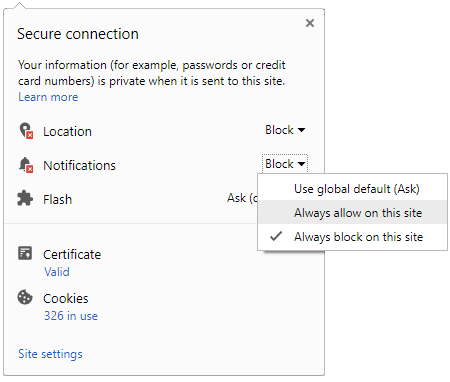
To start receiving timely alerts, as shown below click on the Green “lock” icon next to the address bar
Click it and Unblock the Notifications
Close X
Close X
To Start receiving timely alerts please follow the below steps:
Click on the Menu icon of the browser, it opens up a list of options.
Click on the “Options ”, it opens up the settings page,
Here click on the “Privacy & Security” options listed on the left hand side of the page.
Scroll down the page to the “Permission” section .
Here click on the “Settings” tab of the Notification option.
A pop up will open with all listed sites, select the option “ALLOW“, for the respective site under the status head to allow the notification.
Once the changes is done, click on the “Save Changes” option to save the changes.




 Click it and Unblock the Notifications


 Sign in with Google