இந்தியாவில் இப்படி.. ஐரோப்பாவில் அப்படி..! அதிகம்பேருக்கு வேலைவாய்ப்பு அளிப்பதில் டிசிஎஸ் முதல் இடம்
News
oi-Prasanna
By Prasanna
லண்டன்: ஐரோப்பிய நாடுகளில் அதிகளவில் வேலைவாய்ப்புகளை அளிக்கும் நிறுவன பட்டியலில், தொடர்ந்து 3வது வருடமாக இந்திய நிறுவனமான டிசிஎஸ் முதல் இடத்தை பிடித்துள்ளதாக, ஐரோப்பிய முன்னணி நிறுவன சான்றிதழ் அமைப்பு தெரிவித்துள்ளது.
மேலும் இந்த அமைப்பு ஐரோப்பாவின் 9 முக்கிய துறைகளில் வேலைவாய்ப்பு குறித்து மனிதவள பிரிவில் செய்யப்பட்ட ஆய்வில், டிசிஎஸ் நிறுவனம் முதல் இடத்தை பிடித்துள்ளது. ஆனால் இந்தியாவில் இந்நிறுவனம் சில மாதங்களுக்கு முன்பு பணியாளர்கள் வெளியேற்ற நடவடிக்கையைில் இறங்கியது குறிப்பிடதக்கது.
8 ஐரோப்பிய நாடுகள்
ஐடித்துறையில் முன்னணி நிறுவனமாக திகழும் டிசிஎஸ் நிறுவனம் யு.கே, பெல்ஜியம், நெதர்லாந்து, ஜெர்மனி, சுவிச்சர்லாந்து, ஸ்வீடன், டென்மார்க் மற்றும் நார்வே ஆகிய 8 முக்கிய ஐரோப்பிய நாடுகளில் வேலைவாய்ப்பு அளிப்பதில் முதல் இடத்தில் உள்ளது.
688 நிறுவனங்கள்
மேலும் நிறுவன சான்றிதழ் அமைப்பு ஐரோப்பாவில் 688 நிறுவனங்களில் ஆய்வுகளை மேற்கொண்டது குறிப்பிடதக்கது.
டிசிஎஸ் நிறுவனம்
ஐரோப்பிய நாடுகளில் தகவல் தொழில்நுட்பத் துறையில் சேவையளிக்கும் நிறுவனங்களில் ஐரோப்பிய வாடிக்கையாளர்களின் எதிர்பார்ப்புகளுக்கு இணங்க செயல்படும் நிறுவனமாக டிசிஎஸ் திகழ்வதாகவும் இந்த நிறுவன சான்றிதழ் அமைப்பு தெரிவித்து இருந்தது.
மொத்த பணியாளர்கள்
டிசிஎஸ் நிறுவனத்தில் உலக நாடுகளில் உள்ள கிளைகளில் சுமார் 3,18,000 பணியாளர்கள் பணியாளர்கள் பணியாற்றி வருகின்றனர். மேலும் நடப்பு நிதியாண்டில் 35,000 பணியாளர்களை இணைப்பதாக இந்நிறுவனம் குறிப்பிட்டு இருந்தது குறிப்பிடதக்கது.
பணியாளர்கள் வெளியேற்றம்
Notifications
Settings
Clear Notifications
No New Notifications
Notifications
Use the toggle to switch on notifications
Block for 8 hours
Block for 12 hours
Block for 24 hours
Don't block
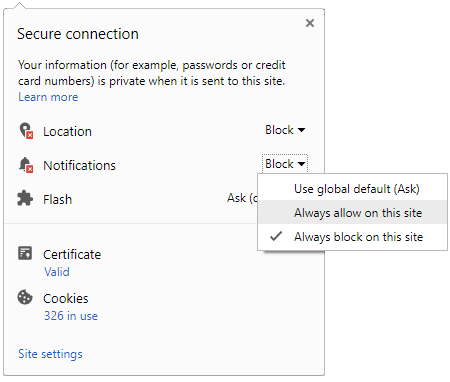
To start receiving timely alerts, as shown below click on the Green “lock” icon next to the address bar
Click it and Unblock the Notifications
Close X
Close X
To Start receiving timely alerts please follow the below steps:
Click on the Menu icon of the browser, it opens up a list of options.
Click on the “Options ”, it opens up the settings page,
Here click on the “Privacy & Security” options listed on the left hand side of the page.
Scroll down the page to the “Permission” section .
Here click on the “Settings” tab of the Notification option.
A pop up will open with all listed sites, select the option “ALLOW“, for the respective site under the status head to allow the notification.
Once the changes is done, click on the “Save Changes” option to save the changes.



 Click it and Unblock the Notifications


 Sign in with Google