ஜபாங்-இல் ஜாக்பாட்.. 70 சதவீதம் வரை அதிரடி தள்ளுபடி..!
News
Published: Tuesday, May 3, 2016, 10:37 [IST]
நாட்டில் சிறிதும் பெரிதுமாகப் பல ஆன்லைன் சில்லறை விற்பனை தளங்கள் முளைத்துள்ள நிலையில் வர்த்தகப் போட்டிக்காக நிறுவனங்கள் அதிரடி தள்ளுபடிகளை வாடிக்கையாளர்களுக்கு அள்ளி வீசி வருகிறது.
தற்போது ஜபாங் மற்றும் மொபிவிக் ஆகிய இரு நிறுவனங்கள் இணைந்து அதிரடி ஆஃபர்களை அறிவித்துள்ளது. இதில் ஐபாங் நிறுவனம் தனது இணையதள விற்பனையில் 70 சதவீதம் வரையிலான தள்ளுபடியும், மொபிவிக் நிறுவன ரீசார்ஜில் 50 சதவீத தள்ளுபடியும் அறிவித்துள்ளது.
HDFC Bank offer: Get Flat 25% OFF on min. Rs 1999 order using Jabong Coupons
Mobikwik users- Shop via app and enjoy up to Rs.150 cashback + 10% reduction using Jabong coupon
Mobikwik Offers: Grab the cashback of 50% on recharges and bill payments
Mobile Recharge, Bill Payments, DTH Recharge with 21% Cashback only at MOBIKWIK
Order from Big basket & get Rs.200 cashback with Mobikwik coupon Hurry Up!
Share This Article
English summary
MAGNIFICENT MAY OFFERS! Upto 70% Off at Jabong
Jabong and Mobikwik welcomes may month with some amazing offers for their customers.
Story first published: Tuesday, May 3, 2016, 10:37 [IST]
See More On: oneindia coupons, tamil goodreturns, goodreturns, icici, sbi, kotak, axis, hdfc, citi, ஒன்இந்தியா கூப்பன், ஐசிஐசிஐ, எஸ்பிஐ, கோட்டாக், ஆக்சிஸ், ஹெச்டிஎப்சி, சிட்டி
Other articles published on
May 3, 2016
Block for 8 hours
Block for 12 hours
Block for 24 hours
Don't block
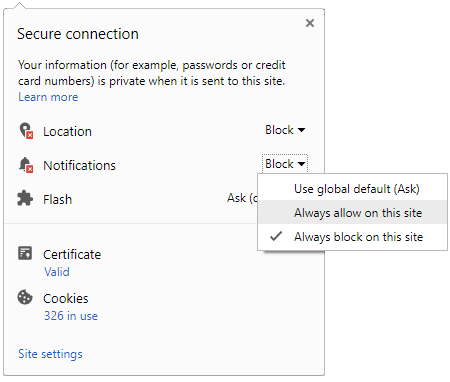
To start receiving timely alerts, as shown below click on the Green “lock” icon next to the address bar
Click it and Unblock the Notifications
Close X
Close X
To Start receiving timely alerts please follow the below steps:
Click on the Menu icon of the browser, it opens up a list of options. Click on the “Options ”, it opens up the settings page, Here click on the “Privacy & Security” options listed on the left hand side of the page. Scroll down the page to the “Permission” section . Here click on the “Settings” tab of the Notification option. A pop up will open with all listed sites, select the option “ALLOW“, for the respective site under the status head to allow the notification. Once the changes is done, click on the “Save Changes” option to save the changes. Gender
Select your Gender
Age
Select your Age Range



 Click it and Unblock the Notifications


 Sign in with Google