ரூ.10,000 வரை கேஷ்பேக்.. முசாஃபீர் அளிக்கும் அதிரடி ஆஃபர்கள்..!
News
Published: Thursday, May 19, 2016, 18:02 [IST]
உங்கள் கோடைக்கால விடுமுறையைச் சிறப்பானதாகவும், மலிவானதாகவும் ஆக்க முசாஃபீர் நிறுவனம் 10,000 ரூபாய் வரையிலான கேஷ்பேக் அளிக்கும் கூப்பன் மற்றும் ஆஃப்ர்களை அளிக்கிறது.
இதனைத் தமிழ் குட்ரிட்டன்ஸ் தளம் மற்றும் ஒன்இந்தியா கூப்பன்ஸ் உடன் இணைந்து வாசகர்களுக்குப் பயன்படும் வகையில் தொகுத்து வழங்கியுள்ளது. பயன்படுத்தி மகிழுங்கள்.
Musafir coupons: International hotel bookings with upto Rs.3000 Off and Rs.10000 Off on Holidays (ICICI Customers Only)
Book hotel accommodation with Musafir coupon & save upto Rs.3000 Now Hurry
Apply Musafir coupons and enjoy Rs.1000 off on international flights
Avail Rs.750 off on international flights using Musafir coupons (IndusInd Customers Only)
Book a holiday now: get the next one free! Only at Musafir Hurry up!
Share This Article
English summary
MUSAFIR OFFERS! Get Upto Rs.10000 Cashback
Here are some amazing bank coupons and offers this week. You really cannot miss on, Pick the latest Musafir coupons and make the best use of it this summer
Story first published: Thursday, May 19, 2016, 18:02 [IST]
See More On: oneindia coupons, tamil goodreturns, goodreturns, icici, sbi, kotak, axis, hdfc, citi, ஒன்இந்தியா கூப்பன், ஐசிஐசிஐ, எஸ்பிஐ, கோட்டாக், ஆக்சிஸ், ஹெச்டிஎப்சி, சிட்டி
Other articles published on
May 19, 2016
Block for 8 hours
Block for 12 hours
Block for 24 hours
Don't block
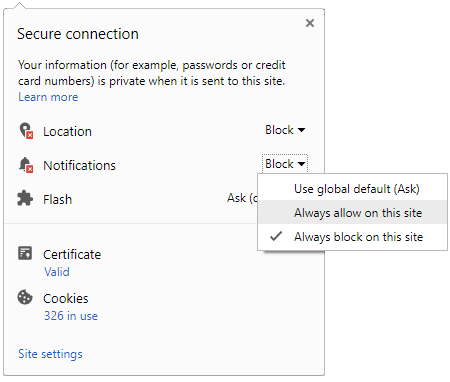
To start receiving timely alerts, as shown below click on the Green “lock” icon next to the address bar
Click it and Unblock the Notifications
Close X
Close X
To Start receiving timely alerts please follow the below steps:
Click on the Menu icon of the browser, it opens up a list of options. Click on the “Options ”, it opens up the settings page, Here click on the “Privacy & Security” options listed on the left hand side of the page. Scroll down the page to the “Permission” section . Here click on the “Settings” tab of the Notification option. A pop up will open with all listed sites, select the option “ALLOW“, for the respective site under the status head to allow the notification. Once the changes is done, click on the “Save Changes” option to save the changes. Gender
Select your Gender
Age
Select your Age Range




 Click it and Unblock the Notifications


 Sign in with Google