ஹோட்டல் புக்கிங் சேவையில் 70% தள்ளுபடி: மேக் மை டிரிப்
News
Published: Tuesday, May 31, 2016, 11:17 [IST]
உங்கள் விடுமுறை நாட்களை இனிதாக்கும் எளிமையான ஆன்லைன் ஹோட்டல் மற்றும் விமான டிக்கெட் முன்பதிவில் 70 சதவீதம் வரையிலான தள்ளுபடி கிடைத்தால் எப்படி இருக்கும்...?
உண்மையாகத்தான், நாட்டின் முன்னணி ஆன்லைன் ஹோட்டல் மற்றும் விமான டிக்கெட் புக்கிங் நிறுவனமான மேக் மை டிரிப் வங்கி வாயிலாகச் சுமார் 70 சதவீதம் வரையிலான தள்ளுபடிகளையும் சலுகையும் அளிக்கிறது.
ஆனால் இச்சலுகையை மேக் மை டிரிப் நிறுவனம் கூப்பன் வாயிலாகவே அளிக்கிறது, இதனை மொத்தமாகத் தொகுத்துத் தமிழ் குட்ரிட்டன்ஸ் தளமும், ஒன்இந்தியா கூப்பன் இணைந்து வாசகர்களுக்கு அளிக்கிறது.
Makemytrip Coupons: Domestic hotels are available with upto 70% cashback
Get up to Rs.1000 money back with SBI Bank for Flights in india by using makemytrip coupon
Makemytrip offers upto 70% off on domestic hotel bookings Standard Chartered
Grab Makemytrip coupon & save Rs.3000 on booking a stay (CitiBank Customers Only)
Kindle Unlimited! Flat Rs.1000 off for 12 months membership! Only at Amazon India
Share This Article
English summary
Makemytrip: Get Upto 70% Off on Domestic Hotels and More
Ready to use some top Bank coupons this week which will not just help you save money, But will bring some heavy cashback, Back to your pockets
Story first published: Tuesday, May 31, 2016, 11:17 [IST]
See More On: oneindia coupons, tamil goodreturns, goodreturns, icici, sbi, kotak, axis, hdfc, citi, ஒன்இந்தியா கூப்பன், ஐசிஐசிஐ, எஸ்பிஐ, கோட்டாக், ஆக்சிஸ், ஹெச்டிஎப்சி, சிட்டி
Other articles published on
May 31, 2016
Block for 8 hours
Block for 12 hours
Block for 24 hours
Don't block
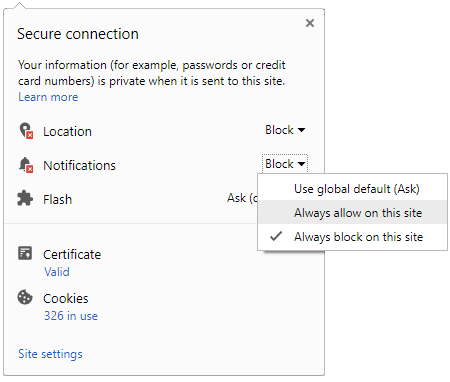
To start receiving timely alerts, as shown below click on the Green “lock” icon next to the address bar
Click it and Unblock the Notifications
Close X
Close X
To Start receiving timely alerts please follow the below steps:
Click on the Menu icon of the browser, it opens up a list of options. Click on the “Options ”, it opens up the settings page, Here click on the “Privacy & Security” options listed on the left hand side of the page. Scroll down the page to the “Permission” section . Here click on the “Settings” tab of the Notification option. A pop up will open with all listed sites, select the option “ALLOW“, for the respective site under the status head to allow the notification. Once the changes is done, click on the “Save Changes” option to save the changes. Gender
Select your Gender
Age
Select your Age Range




 Click it and Unblock the Notifications


 Sign in with Google